


Skip to content

Automate WhatsApp Order Confirmations: Keep the Human Touch

Automating WhatsApp order confirmations for D2C brands doesn't have to feel robotic. This guide explores practical design decisions to integrate the WhatsApp Business API effectively, ensuring customer satisfaction and brand loyalty.

Himanshu Chawla •Oct 30, 2026 •8 min read
Automate WhatsApp Order Confirmations: Keep the Human Touch
In this article
  1. Why WhatsApp for Order Confirmations?
  2. Choosing the Right WhatsApp API Solution
  3. Designing Your Order Confirmation Message
  4. Essential Information
  5. Adding the Personal Touch
  6. Structuring the Flow
  7. Handling Next Steps and Support
  8. Integrating with E-commerce Platforms
  9. The Future: AI and Enhanced Interactions
  10. Frequently asked questions

Listen to a 1-minute AI summary

Generated on demand and read aloud by your browser.

Sending order confirmations via WhatsApp is a great way for D2C brands to connect instantly with customers. However, automating these messages without sounding like a bot is crucial. You want to confirm the order details while also reinforcing your brand's personality and care.

Key takeaways

  • Use the WhatsApp Business API for reliable, scalable order notifications.
  • Design message templates that are informative yet friendly.
  • Personalize messages with customer and order details.
  • Offer clear next steps and support options.
  • Integrate with your e-commerce backend for real-time updates.

Why WhatsApp for Order Confirmations?

WhatsApp has over two billion users globally. For D2C brands, it's a direct line to your customers, offering higher open rates than email. When a customer places an order, a timely confirmation on WhatsApp feels immediate and personal. It builds trust and reduces anxiety about the purchase.

Choosing the Right WhatsApp API Solution

For business-level automation, you need the official WhatsApp Business API. This isn't the regular WhatsApp app. It allows integration with your e-commerce platforms (like Shopify, WooCommerce, custom builds) and CRM systems. You can send templated messages for order confirmations, shipping updates, and more. We run WaZappy, our own SaaS for this, and have seen how crucial the API's reliability is.

Pros of WhatsApp API

  • High engagement rates.
  • Direct customer communication channel.
  • Scalable for large order volumes.
  • Enables rich media (images, links).
  • Supports automation workflows.

Cons of WhatsApp API

  • Requires API integration, not plug-and-play.
  • Message template approval process by Meta.
  • Per-message costs apply (though often cheaper than SMS).
  • Strict usage policies to follow.

Designing Your Order Confirmation Message

The core of automating with a personal touch is message design. You need to balance information with brand voice.

Essential Information

Every confirmation must include:

  • Order Number (clear and prominent).
  • Order Date.
  • Items ordered (a brief summary or link to order details).
  • Total Amount Paid.
  • Shipping Address.
  • Estimated Delivery Window (if available).

Adding the Personal Touch

This is where you shine:

  • Greeting: Use the customer's name. "Hi [Customer Name]," is much better than a generic intro.
  • Brand Voice: Inject your brand's personality. Are you playful, professional, eco-conscious? Let it show in the tone.
  • Gratitude: Thank them for their purchase. "Thanks for choosing us!" or "We're excited to get this to you!"
  • Visuals: If your platform allows, include a small, branded image or even a product thumbnail.
WhatsApp Template Message (Example)
Header: Order Confirmation

Body:
Hi {{1}},

Thank you for your order #{{2}} placed on {{3}}!

We're busy preparing your items:
{{4}}

Total: {{5}}

It will be shipped to:
{{6}}

We estimate delivery between {{7}}.

We'll send another update when your order ships!

Best,
The [Your Brand Name] Team

In this template:

  • {{1}}: Customer Name
  • {{2}}: Order Number
  • {{3}}: Order Date
  • {{4}}: Order Summary (e.g., "1x Product A, 2x Product B")
  • {{5}}: Total Amount
  • {{6}}: Shipping Address
  • {{7}}: Estimated Delivery Window

Structuring the Flow

  1. Trigger: Customer completes checkout on your website.
  2. Backend Action: Your e-commerce system sends order data to your integration layer (e.g., a webhook handler).
  3. WhatsApp API Call: The integration layer calls the WhatsApp Business API, passing the template and variable data.
  4. Message Delivery: WhatsApp delivers the formatted message to the customer's phone.
  5. Customer Response: The customer can reply with questions, which your system should be ready to handle (manually or via an AI agent).
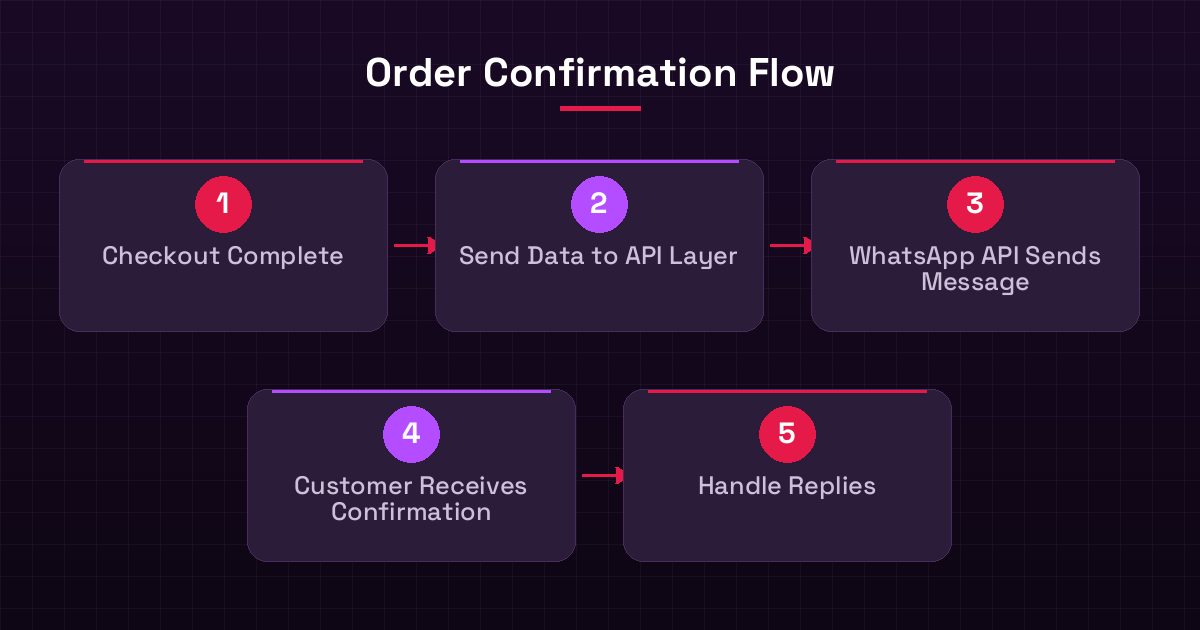
Order Confirmation Flow
Automated WhatsApp Order Confirmation Process

Handling Next Steps and Support

Your confirmation message is also a touchpoint for support. Make it easy for customers to get help:

  • Link to Order Status: Provide a direct link where they can track their order online.
  • Customer Service Contact: Clearly state how they can reach your support team (e.g., "Reply to this message" or "Call us at [Phone Number]").
  • FAQ Link: If you have a good FAQ page, link to it.
From our projects: When designing templates, always get them approved by Meta first. Sometimes, minor wording changes can make a big difference in approval speed. Also, test your templates thoroughly with different order types and customer names to ensure they render correctly.

Integrating with E-commerce Platforms

Most modern e-commerce platforms offer integrations or webhooks that can trigger actions upon order completion. You'll need a middleware or custom backend service to:

  • Receive the order data (e.g., via webhook).
  • Format the data according to your WhatsApp template.
  • Send the request to the WhatsApp Business API endpoint.

This is where a solid API integration becomes vital. For platforms like Shopify, you can often use apps or build custom connectors. For custom-built sites, you have full control.

The Future: AI and Enhanced Interactions

Beyond basic confirmations, the WhatsApp Business API allows for more advanced features:

  • Shipping Updates: Automate notifications when an order ships, is out for delivery, or has been delivered.
  • Delivery Issues: Proactively inform customers about delays and offer solutions.
  • AI Chatbots: Integrate an AI chatbot to handle common post-order queries directly within WhatsApp, like "Where is my order?" or "How do I return this?" This frees up your human support team for complex issues.
  • Payments & Invoicing: You can even integrate payments and send GST-compliant invoices directly via WhatsApp, streamlining the entire WhatsApp commerce experience.

By carefully designing your automated messages and integrating them with your backend systems, you can ensure every customer order confirmation is not just informative but also a positive brand interaction. It's about using technology to enhance, not replace, the human element of your D2C business.

Free consultation

Want this built for your business?

Talk to our technical team — we will map your requirement and share a clear plan.

Listen to a 1-minute AI summary

Generated on demand and read aloud by your browser.

Sending order confirmations via WhatsApp is a great way for D2C brands to connect instantly with customers. However, automating these messages without sounding like a bot is crucial. You want to confirm the order details while also reinforcing your brand's personality and care.

Key takeaways

  • Use the WhatsApp Business API for reliable, scalable order notifications.
  • Design message templates that are informative yet friendly.
  • Personalize messages with customer and order details.
  • Offer clear next steps and support options.
  • Integrate with your e-commerce backend for real-time updates.

Why WhatsApp for Order Confirmations?

WhatsApp has over two billion users globally. For D2C brands, it's a direct line to your customers, offering higher open rates than email. When a customer places an order, a timely confirmation on WhatsApp feels immediate and personal. It builds trust and reduces anxiety about the purchase.

Choosing the Right WhatsApp API Solution

For business-level automation, you need the official WhatsApp Business API. This isn't the regular WhatsApp app. It allows integration with your e-commerce platforms (like Shopify, WooCommerce, custom builds) and CRM systems. You can send templated messages for order confirmations, shipping updates, and more. We run WaZappy, our own SaaS for this, and have seen how crucial the API's reliability is.

Pros of WhatsApp API

  • High engagement rates.
  • Direct customer communication channel.
  • Scalable for large order volumes.
  • Enables rich media (images, links).
  • Supports automation workflows.

Cons of WhatsApp API

  • Requires API integration, not plug-and-play.
  • Message template approval process by Meta.
  • Per-message costs apply (though often cheaper than SMS).
  • Strict usage policies to follow.

Designing Your Order Confirmation Message

The core of automating with a personal touch is message design. You need to balance information with brand voice.

Essential Information

Every confirmation must include:

  • Order Number (clear and prominent).
  • Order Date.
  • Items ordered (a brief summary or link to order details).
  • Total Amount Paid.
  • Shipping Address.
  • Estimated Delivery Window (if available).

Adding the Personal Touch

This is where you shine:

  • Greeting: Use the customer's name. "Hi [Customer Name]," is much better than a generic intro.
  • Brand Voice: Inject your brand's personality. Are you playful, professional, eco-conscious? Let it show in the tone.
  • Gratitude: Thank them for their purchase. "Thanks for choosing us!" or "We're excited to get this to you!"
  • Visuals: If your platform allows, include a small, branded image or even a product thumbnail.
WhatsApp Template Message (Example)
Header: Order Confirmation

Body:
Hi {{1}},

Thank you for your order #{{2}} placed on {{3}}!

We're busy preparing your items:
{{4}}

Total: {{5}}

It will be shipped to:
{{6}}

We estimate delivery between {{7}}.

We'll send another update when your order ships!

Best,
The [Your Brand Name] Team

In this template:

  • {{1}}: Customer Name
  • {{2}}: Order Number
  • {{3}}: Order Date
  • {{4}}: Order Summary (e.g., "1x Product A, 2x Product B")
  • {{5}}: Total Amount
  • {{6}}: Shipping Address
  • {{7}}: Estimated Delivery Window

Structuring the Flow

  1. Trigger: Customer completes checkout on your website.
  2. Backend Action: Your e-commerce system sends order data to your integration layer (e.g., a webhook handler).
  3. WhatsApp API Call: The integration layer calls the WhatsApp Business API, passing the template and variable data.
  4. Message Delivery: WhatsApp delivers the formatted message to the customer's phone.
  5. Customer Response: The customer can reply with questions, which your system should be ready to handle (manually or via an AI agent).
Order Confirmation Flow
Automated WhatsApp Order Confirmation Process

Handling Next Steps and Support

Your confirmation message is also a touchpoint for support. Make it easy for customers to get help:

  • Link to Order Status: Provide a direct link where they can track their order online.
  • Customer Service Contact: Clearly state how they can reach your support team (e.g., "Reply to this message" or "Call us at [Phone Number]").
  • FAQ Link: If you have a good FAQ page, link to it.
From our projects: When designing templates, always get them approved by Meta first. Sometimes, minor wording changes can make a big difference in approval speed. Also, test your templates thoroughly with different order types and customer names to ensure they render correctly.

Integrating with E-commerce Platforms

Most modern e-commerce platforms offer integrations or webhooks that can trigger actions upon order completion. You'll need a middleware or custom backend service to:

  • Receive the order data (e.g., via webhook).
  • Format the data according to your WhatsApp template.
  • Send the request to the WhatsApp Business API endpoint.

This is where a solid API integration becomes vital. For platforms like Shopify, you can often use apps or build custom connectors. For custom-built sites, you have full control.

The Future: AI and Enhanced Interactions

Beyond basic confirmations, the WhatsApp Business API allows for more advanced features:

  • Shipping Updates: Automate notifications when an order ships, is out for delivery, or has been delivered.
  • Delivery Issues: Proactively inform customers about delays and offer solutions.
  • AI Chatbots: Integrate an AI chatbot to handle common post-order queries directly within WhatsApp, like "Where is my order?" or "How do I return this?" This frees up your human support team for complex issues.
  • Payments & Invoicing: You can even integrate payments and send GST-compliant invoices directly via WhatsApp, streamlining the entire WhatsApp commerce experience.

By carefully designing your automated messages and integrating them with your backend systems, you can ensure every customer order confirmation is not just informative but also a positive brand interaction. It's about using technology to enhance, not replace, the human element of your D2C business.

Free consultation

Want this built for your business?

Talk to our technical team — we will map your requirement and share a clear plan.

Ask a follow-up question

Our AI answers using this article.

Frequently asked questions

Can I send order confirmations from any WhatsApp account?

No, for automated business messages like order confirmations, you must use the official WhatsApp Business API. The regular WhatsApp app is for personal use and does not support this functionality.

How long does it take to get WhatsApp API approval for templates?

Template approval times can vary. Typically, it takes anywhere from a few minutes to 24-48 hours. Complex or policy-violating templates might take longer or be rejected.

What happens if a customer replies to an automated order confirmation?

If a customer replies, it opens a 24-hour customer service window during which you can send free-form messages. After that window closes, you'll need to use a new template message to re-initiate contact.

Is it expensive to use the WhatsApp Business API for order confirmations?

There are costs associated with the WhatsApp Business API, primarily per-conversation fees charged by Meta, which vary by country. However, for D2C brands, the high engagement and automation benefits often make it a cost-effective communication channel compared to other methods.

Himanshu Chawla

Written by

Himanshu Chawla · Founder & Technical Head

Himanshu Chawla founded Infrared Techno in 2012. A B.Tech (Computer Science) graduate, he works across software architecture, AI integration, embedded hardware and SaaS operations, and personally leads technical decisions on client projects.

About Infrared Techno →

Stay in the loop

New articles, free tools and product updates — no spam, unsubscribe any time.

Ready to build? Talk to a technical expert today.

Free consultation · Clear proposal · No obligation